Oracle Analytics Cloud MCP Server

Unlocking Oracle Analytics Cloud with AI: MCP for Oracle Analytics
The Challenge: Bridging gaps between AI and Enterprise Analytics
Over the last year or so, we’ve seen a major shift in how we understand and use analytics systems—especially in the enterprise world. Modern BI platforms have grown more capable, and AI models have matured at an incredible pace. Expectations have evolved with them. Users now want answers instantly, workflows that feel effortless, and insights that surface proactively, not after a dozen filters, clicks, and exports.
Oracle Analytics has already embraced this direction with features like Insights and the AI Assistant, which bring intelligence directly into the analytical experience. These tools help users explore data more intuitively, explain trends in plain language, and flag anomalies before they become issues. They’ve raised the bar for what “AI in analytics” should look like.
But even with these advances, one challenge has stubbornly remained. We were not there yet.
For some time, business analysts have faced a fundamental dilemma: powerful AI assistants like Claude or ChatGPT are excellent at reasoning, explanation, and ideation, but they can’t directly access enterprise analytics data such as what sits inside Oracle Analytics. The only workaround was to paste numbers into chats, write long descriptions of dashboards, or manually run queries in another window. All of this interrupts the natural flow of analytical thinking.
The MCP Server for Oracle Analytics changes that dynamic completely.
It’s not just another integration—it’s a shift in how AI and business intelligence can work together. Instead of forcing analysts to bridge the gap manually, MCP establishes a secure, structured channel that lets AI tools interact with OAC directly and intelligently. With MCP, your AI assistant doesn’t just talk about your analytics environment—it can finally work with it.
What is MCP?
Since November 2024, Model Context Protocol (MCP) has become one of the big themes in the AI world. I’m not here to write a master thesis on it (there are many others much more qualified to do that), but let me briefly summarize what matters in our context.
At its core, MCP is an open standard created by Anthropic that enables AI assistants to securely connect to external data sources and tools. You can think of it as a universal adapter that lets assistants like Claude speak directly to your enterprise systems in a consistent, well-defined way.
In practical terms, MCP:
- Defines how an assistant can discover what tools and data sources are available
- Standardizes how it can call those tools (e.g., run a query, fetch metadata, trigger a workflow)
- Ensures communication is structured, secure, and predictable, instead of ad-hoc integrations everywhere
Where Oracle Analytics already gives you built-in capabilities like Insights and the AI Assistant inside the platform, MCP focuses on something slightly different: it gives external, general-purpose AI assistants (like Claude, ChatGPT, or others) a clean, standard way to work with Oracle Analytics as one of many enterprise systems in your landscape.
Why MCP matters for analytics?
So why should anyone in analytics care about another “protocol”?
Because MCP is what turns AI assistants from “smart sidekicks” into first-class citizens in your analytics workflows.
With MCP, you don’t just copy-paste numbers into a chat and hope the model interprets them correctly. Instead, the assistant can use a structured, well-documented interface to talk to Oracle Analytics — safely and repeatably.
For Oracle Analytics Cloud specifically, an MCP server means an assistant like Claude can:
- Query your subject areas and datasets using natural language
- Execute Logical SQL with advanced analytics functions
- Discover your data models and metadata (dimensions, measures, hierarchies, joins)
- Generate visualizations based on actual data
- Provide insights that are grounded in your real business metrics, not synthetic examples
From an analytics point of view, the key benefits are:
-
Interoperability
MCP gives you a standard way to integrate multiple AI assistants and tools with the same Oracle Analytics environment, without rebuilding custom connectors each time. -
Modularity
You can swap out or upgrade assistants (Claude today, something else tomorrow) while keeping the same MCP server and Oracle Analytics integration. -
Consistent interfaces
Your “tools” — query execution, metadata exploration, documentation generation, quality checks — are exposed in a clear, predictable way, which makes automation and governance much easier. -
LLM-driven automation
Routine tasks like metadata validation, documentation, or simple QA checks can be handed off to the assistant, freeing analysts to focus on interpretation and decision-making.
In short: MCP doesn’t replace Oracle’s own AI features like Insights or the AI Assistant. Instead, it extends the ecosystem, letting your broader AI tools plug into Oracle Analytics in a clean, standardized, and enterprise-friendly way.
Oracle Analytics Cloud MCP Server
What the MCP Server Does
Think of the MCP Server as a bridge between Oracle Analytics Cloud and modern AI assistants. It allows these AI tools to understand your analytics environment in a structured, secure, and standardized way.
With the MCP Server enabled, users can ask questions in natural language such as:
- “Which customers increased spending by more than 20% this quarter?”
- “Show me which product categories have declining margins.”
- “Are there any data quality issues in the new customer dataset?”
Instead of manually translating these questions into dashboards, filters, or SQL, the AI assistant can directly tap into governed data through Oracle Analytics Cloud and respond with answers grounded in your actual business metrics.
In other words, the MCP Server allows AI clients to:
- Understand what datasets and subject areas you have
- Explore metadata like columns, measures, joins, and hierarchies
- Generate and execute Logical SQL
- Summarize and interpret analytics content
- Help users reason about business questions using real data
And all of this happens within the boundaries of your governed Oracle Analytics environment.
It also means you’re not limited to Oracle’s built-in AI capabilities. You can connect tools such as:
- Claude Desktop
- Cline (VS Code extension)
- Copilot (VS Code extension)
Or even build your own custom AI-powered applications that interact with OAC through MCP.
The Tools Available Through the MCP Server
To make this interaction possible, the Oracle Analytics Cloud MCP Server provides a set of purpose-built tools. These tools don’t require any technical expertise from users, they simply enable the AI assistant to do its job properly:
Discover: oracle_analytics-discoverData
Allows the AI client to list available datasets and subject areas. This is how the
assistant understands what data exists in your environment.
Describe: oracle_analytics-describeData
Retrieves metadata—tables, columns, measures, hierarchies. This helps the AI understand
how your data is structured and how it can be queried responsibly.
Execute: oracle_analytics-executeLogicalSQL
Runs governed Logical SQL queries on your behalf. This ensures that every answer
generated by the AI is based on secure, governed, traceable data—never on guesses or
hallucinations.
These tools work together to give AI clients a complete, structured understanding of your analytics content so they can reason over it, generate insights, and automate tasks in a way that aligns with enterprise governance.
A More Narrative View: Why This Matters
For business users, the MCP Server represents something powerful: a new way of working with analytics.
Instead of navigating dashboards, filtering reports, or asking an analyst to extract something, anyone—from a finance manager to a product owner—can simply ask a question in normal language. The AI assistant interprets the intent, identifies the right data, generates the right query, and delivers a trustworthy answer.
All of this happens without bypassing governance, without exporting data, and without losing control.
The MCP Server essentially extends Oracle Analytics Cloud into the broader AI ecosystem, enabling a future where analytics becomes conversational, intelligent, and seamlessly integrated into everyday decision-making.
How to set it up?
Here is an example how to setup Oracle Analytics Cloud MCP Server with Claude. There is a really nice Oracle Analytics Cloud MCP Server introduction published by Mike Durran, Oracle. I strongly suggest simply to follow his instructions.
The things to consider:
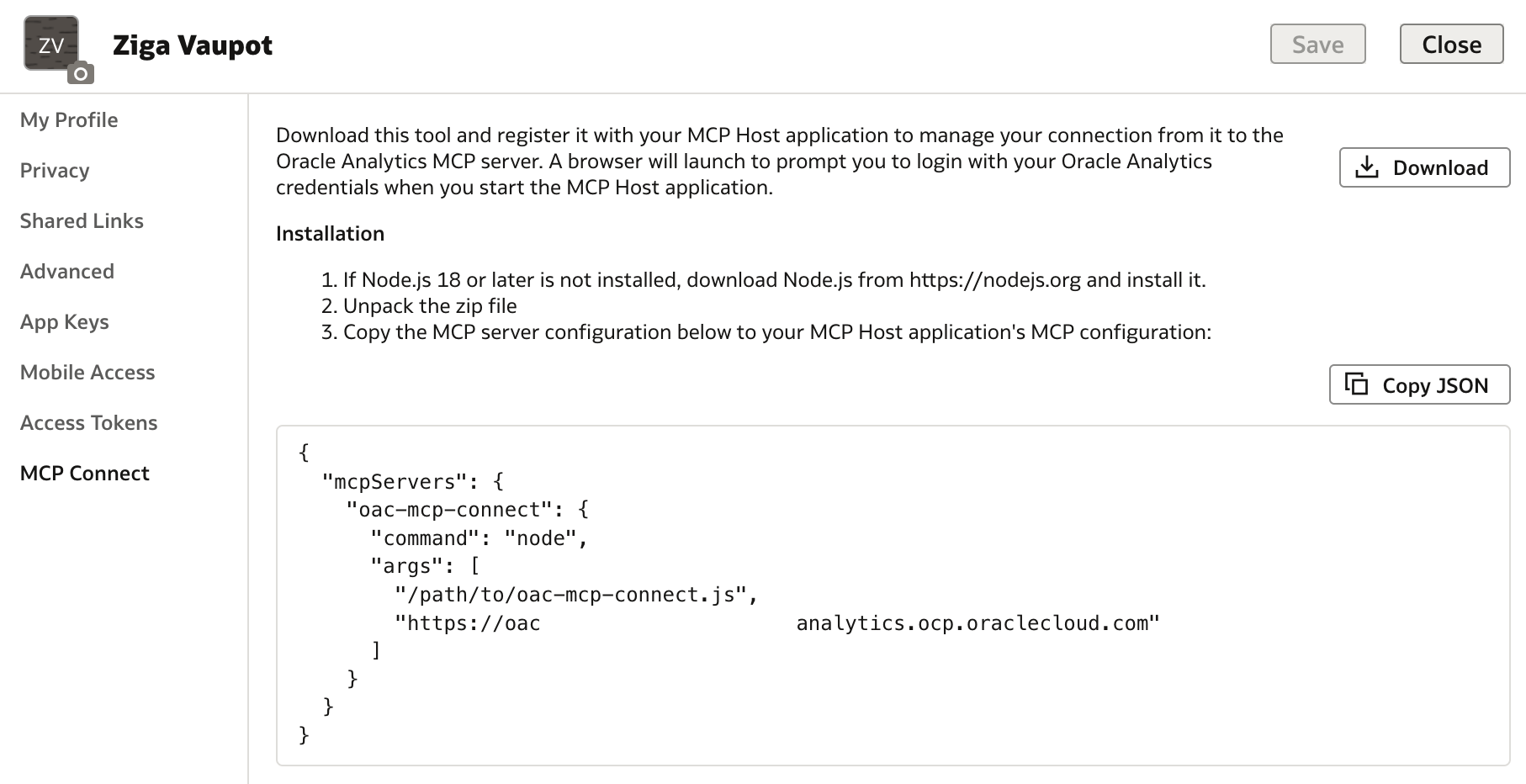
- Retrieve and download MCP server and connection definitions from your profile in Oracle Analytics.
- Update Developer Settings in Claude client.
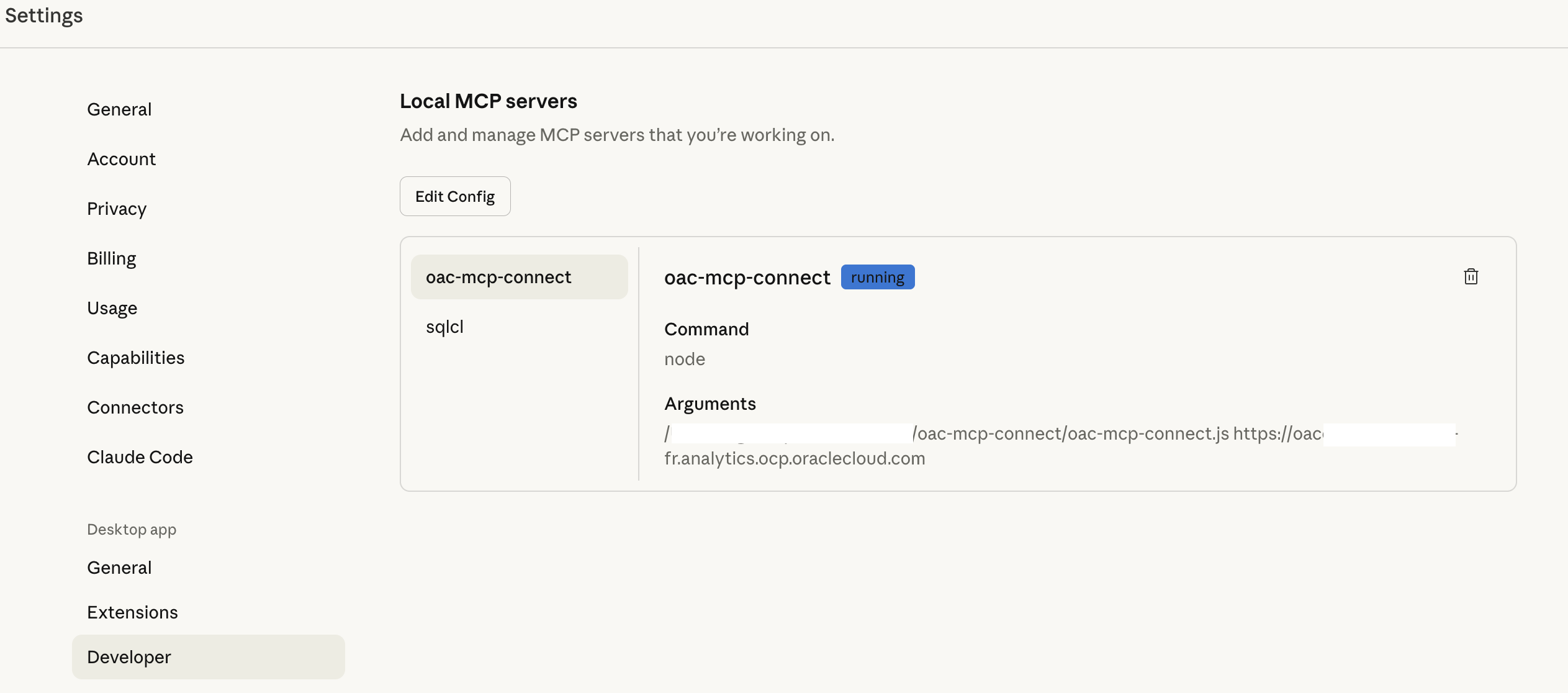
{
  "mcpServers": {
    "oac-mcp-connect": {
      "command": "node",
      "args": [
        "/update-path-to-your-mcp-configuration-folder, ie. oac-mcp-connect/oac-mcp-connect.js",
        "https://update-url-to-your-oac.analytics.ocp.oraclecloud.com"
      ]
    }
  }
}
Then save and restart Claude. Once saved and restarted, you will be asked to provide connection credentials to connect to Oracle Analytics Cloud ... and simply start asking and discussing with Oracle Analytics like you've never before. More on this check out my next blog post.