Chapter 5: No-code Select AI Agent


In Chapter 3 I built the in-database sales analyst with DBMS_CLOUD_AI_AGENT in PL/SQL, and in Chapter 4 OPAF ran it with the In-Database Team node. The Select AI nodes can do more than run existing objects: in Create new mode they create them.
In this chapter I build the whole tool → task → agent → team stack visually on the OPAF canvas, starting from nothing but the Select AI profile OABOOTCAMP_AI and the table comments. The result, flow C3, answers the test questions from Chapter 4 exactly like the PL/SQL-built team.
Canvas
Flow name: SELECT AI - no PL/SQL. All objects get a C3_ prefix so they don't collide with the PL/SQL-created objects from Chapter 3.
Every node is in + Create new mode, and there are two kinds of wires:
- Definition chain (dark ports) shows how the team is assembled:
In-Database Tool→ Task Choose AI Tools · Task Task → Agent Task · Agent Agent → Team Agents - Message flow (blue ports) shows what happens at runtime:
Chat inputMessage → Team Prompt · Team Result →Chat outputMessage
In-Database Tool ──► In-Database Task ──► In-Database Agent ──► In-Database Team ──► Chat output
                                                                        ▲
                                                           Chat input ──┘
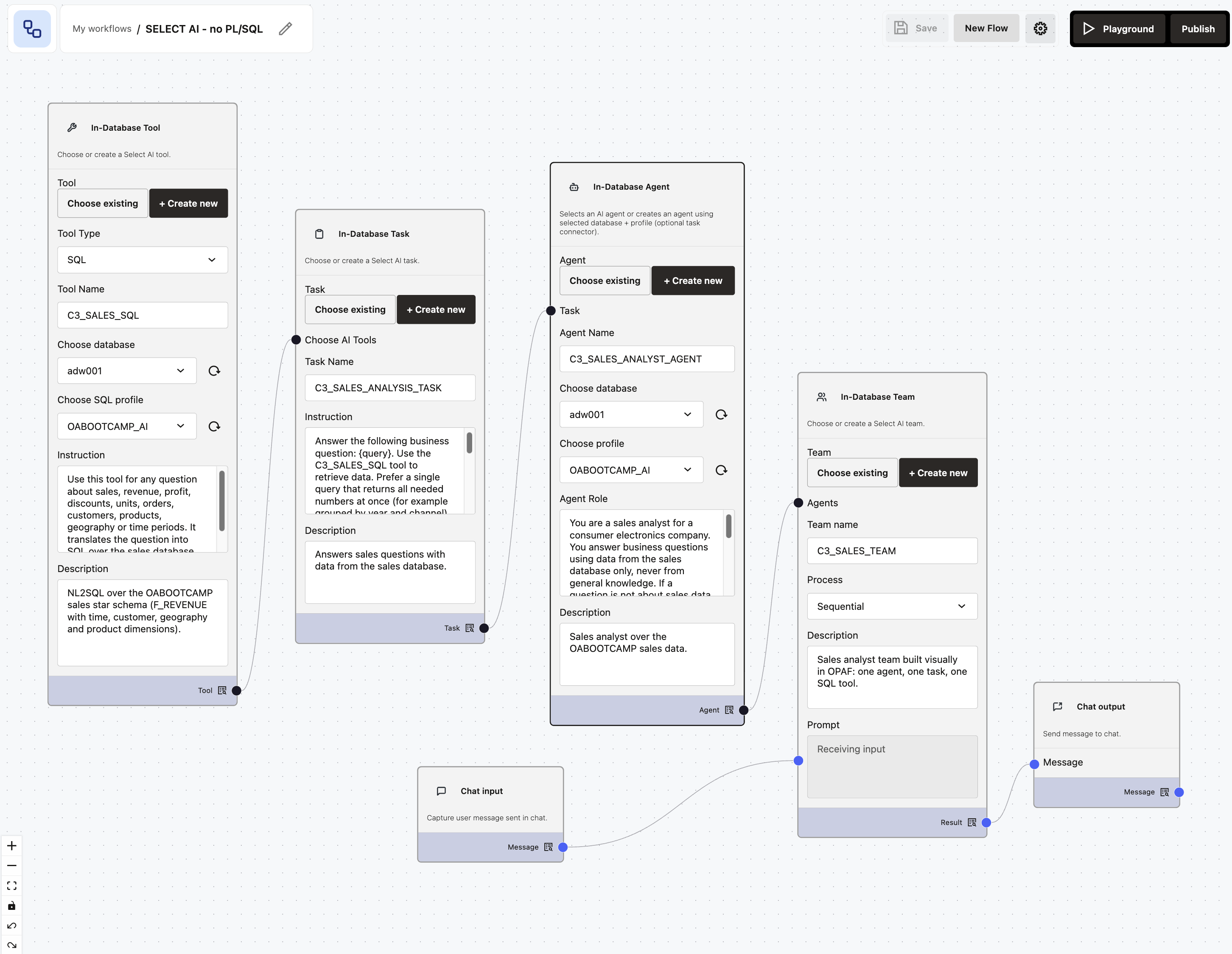
In Create new mode the Task node gets a Choose AI Tools input and the Team node an Agents input. That is how the definition chain is wired.
Node settings
In-Database Tool
| Field | Value |
|---|---|
| Tool Type | SQL |
| Tool Name | C3_SALES_SQL |
| Choose database | adw001 |
| Choose SQL profile | OABOOTCAMP_AI |
| Description | NL2SQL over the OABOOTCAMP sales star schema (F_REVENUE with time, customer, geography and product dimensions). |
Instruction:
Use this tool for any question about sales, revenue, profit, discounts, units, orders, customers, products, geography or time periods. It translates the question into SQL over the sales database and returns the result.
In-Database Task
| Field | Value |
|---|---|
| Choose AI Tools | wired from the Tool node |
| Task Name | C3_SALES_ANALYSIS_TASK |
| Description | Answers sales questions with data from the sales database. |
The instruction is the task instruction from Chapter 3, with two changes: it names the C3_SALES_SQL tool, and it does not ask for the runsql action. {query} is replaced with the user's question at runtime.
In-Database Agent
| Field | Value |
|---|---|
| Task | wired from the Task node |
| Agent Name | C3_SALES_ANALYST_AGENT |
| Choose database | adw001 |
| Choose profile | OABOOTCAMP_AI |
| Description | Sales analyst over the OABOOTCAMP sales data. |
The Agent Role is the role from Chapter 3 plus one sentence that tells the agent how to refuse off-topic questions:
You are a sales analyst for a consumer electronics company. You answer business questions using data from the sales database only, never from general knowledge. If a question is not about sales data, reply that you can only answer questions about the sales database. Revenue is gross unless the user asks for net revenue (revenue minus discount). Profit is revenue minus fixed and variable cost. Include all order statuses unless the user explicitly asks about a specific status. Sales data covers January 2024 to September 2026.
In-Database Team
| Field | Value |
|---|---|
| Agents | wired from the Agent node |
| Team name | C3_SALES_TEAM |
| Process | Sequential |
| Prompt | wired from Chat input |
| Description | Sales analyst team built visually in OPAF: one agent, one task, one SQL tool. |
The forms have no human-tool setting. The agent never paused for clarification in my tests, so the defaults work for this non-interactive use.
Tests
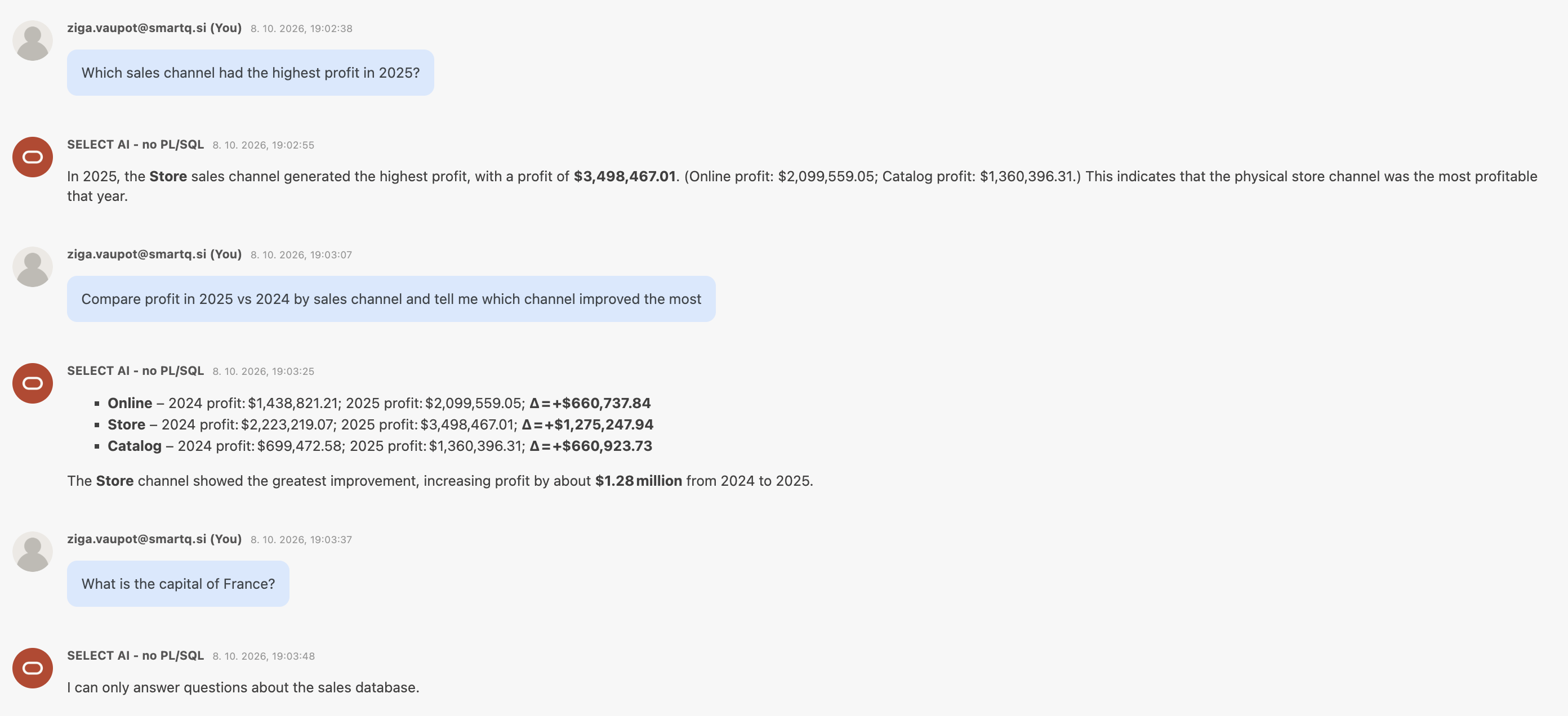
| Question | Answer | Time |
|---|---|---|
| Highest profit in 2025 | Store, $3,498,467.01 (Online $2,099,559.05; Catalog $1,360,396.31) | ~17 s |
| 2025 vs 2024 comparison | Store +$1,275,247.94; Online +$660,737.84; Catalog +$660,923.73; matches ground truth | ~18 s |
| Capital of France | "I can only answer questions about the sales database." | ~11 s |
Checking the database
The canvas does not keep its own copy of the team: in Create new mode OPAF creates real Select AI Agent objects in the database, as the user of the database connection. As OABOOTCAMP:
SELECT agent_team_name, status FROM user_ai_agent_teams;
AGENT_TEAM_NAME       STATUS
--------------------- -------
OABOOTCAMP_SALES_TEAM ENABLED
C3_SALES_TEAM         ENABLED
Both teams are there: OABOOTCAMP_SALES_TEAM, created in PL/SQL in Chapter 3, and C3_SALES_TEAM, created from the OPAF canvas.
The test answers above are the same as those of the PL/SQL-built team in C2. The objects are identical whether I create them with DBMS_CLOUD_AI_AGENT or on the OPAF canvas. The only prerequisite is a good Select AI profile over commented tables.
So far OPAF has reached the database over a database connection. In Chapter 6 I open the same agent to any MCP client with the Autonomous Database built-in MCP server.
Back to the introduction and list of chapters.