Chapter 2: Connecting ADB to OCI Generative AI

With the schema prepared in Chapter 1, the next step is giving Select AI an LLM to work with. In my setup the database calls OCI Generative AI with its own resource principal, so no API keys are stored anywhere in the database.
In this chapter I check that the database version and the model support what I need, set up the IAM dynamic group and policy, enable the resource principal and network access, create the Select AI profile that every later flow uses, and run a few smoke tests to confirm that the comments from Chapter 1 actually shape the generated SQL.
Checking the environment
v$instance is not readable by a regular ADB user, so I check the version with product_component_version:
SELECT product, version_full FROM product_component_version;
The result is Oracle AI Database 26ai Enterprise Edition 23.26.4.1.0. DBMS_CLOUD_AI_AGENT requires 23.26 or later on 26ai, so Select AI Agent is available.
In the OCI GenAI Playground (Chat) in Germany Central (Frankfurt) I confirmed that openai.gpt-oss-120b is available on-demand. Fallback models in the same region are meta.llama-3.3-70b-instruct, cohere.command-a-03-2025 and google.gemini-2.5-*.

IAM: dynamic group and policy
The database needs IAM permission to call OCI Generative AI.
- Copy the ADW OCID: Oracle Database → Autonomous Database → (my ADW) → OCID → Copy.
- Identity & Security → Domains → Default → Dynamic groups → Create dynamic group.
- Name:
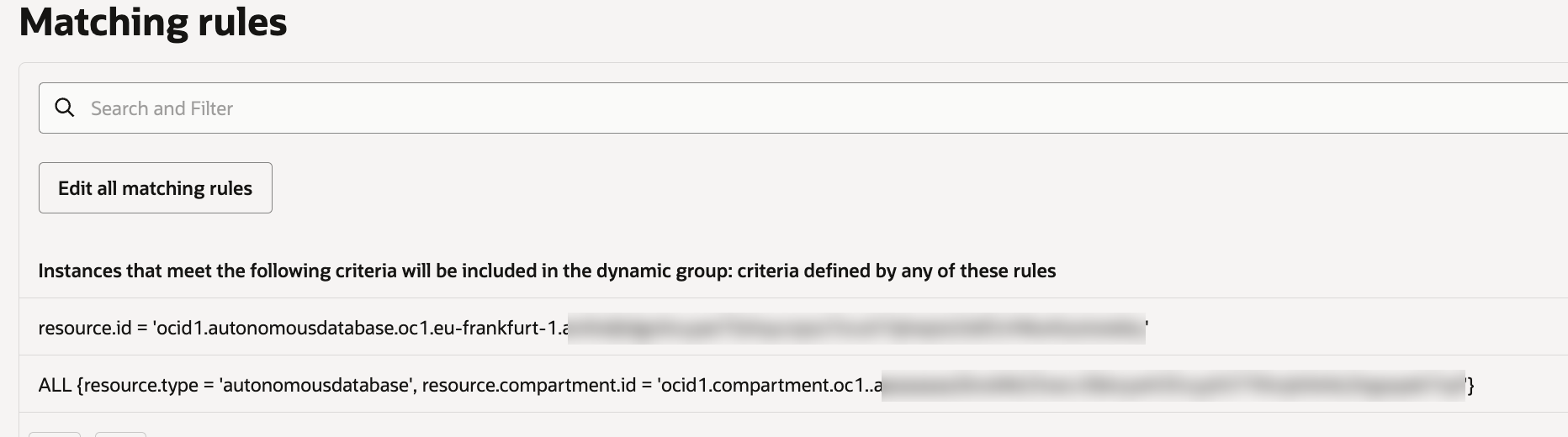
dg-adw-selectai. Description:ADW OABOOTCAMP - Select AI access to OCI GenAI. - Choose "Match any rules defined below" and type the rules directly into the rule fields, because the rule builder does not offer Autonomous Database:
resource.id = 'ocid1.autonomousdatabase.oc1.eu-frankfurt-1.<adw-ocid>'
ALL {resource.type = 'autonomousdatabase', resource.compartment.id = '<compartment-ocid-of-the-ADW>'}
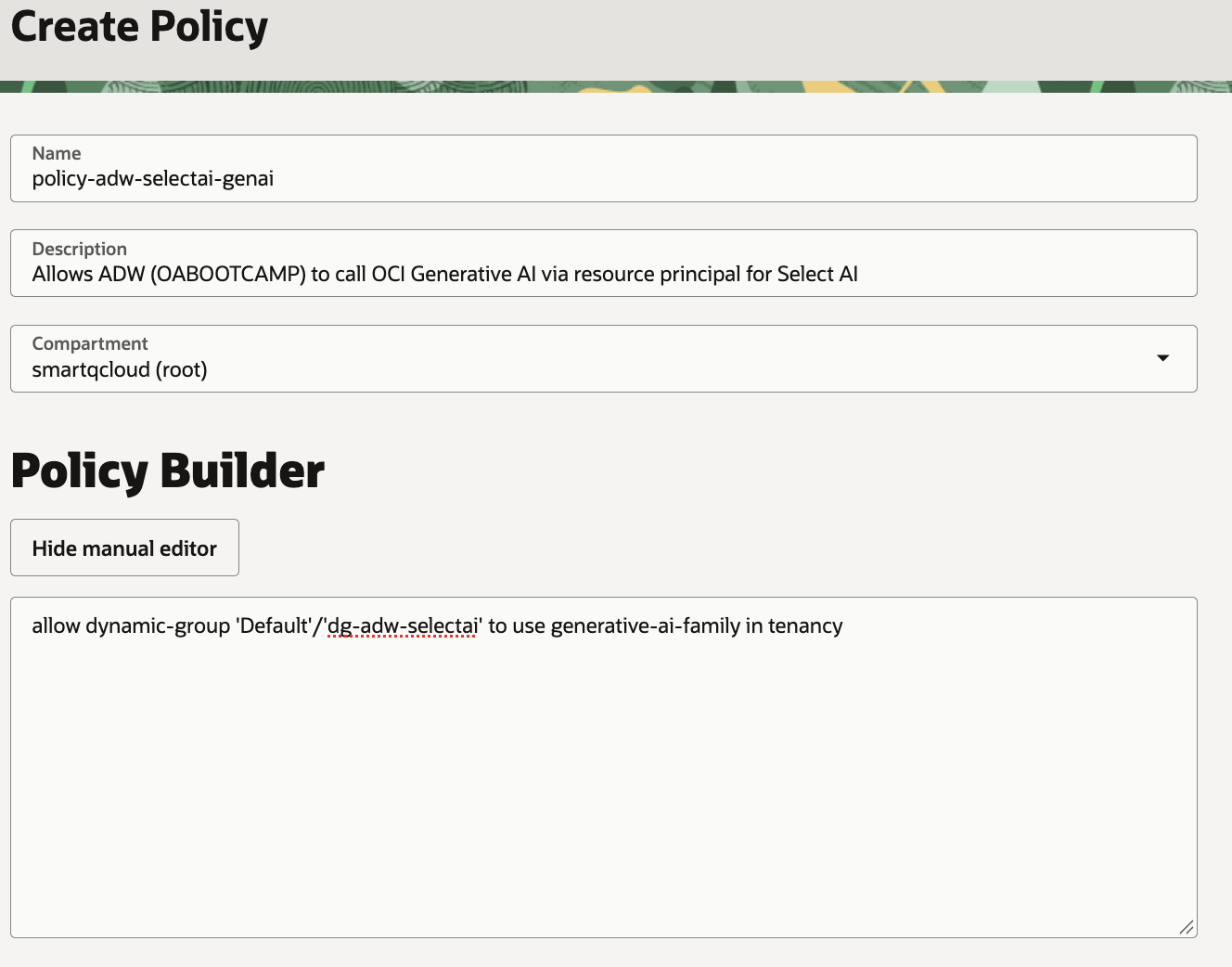
Then navigate to Identity & Security → Policies, choose the root compartment and Create Policy, with the description Allows ADW (OABOOTCAMP) to call OCI Generative AI via resource principal for Select AI and these statements in the manual editor:
allow dynamic-group 'Default'/'dg-adw-selectai' to use generative-ai-family in tenancy
allow any-user to use generative-ai-family in tenancy where request.principal.type = 'autonomousdatabase'
The second statement matches any Autonomous Database resource principal regardless of the dynamic group.
IAM changes take a few minutes to propagate. If Select AI returns ORA-20404 "Object not found" from the GenAI endpoint, that is OCI's NotAuthorizedOrNotFound: an IAM problem, not a missing model.
Resource principal, grants and network access
The IAM policy allows Autonomous Databases to call OCI Generative AI, but the database user still has to be able to use that permission. This step prepares OABOOTCAMP for it, in three parts:
- Resource principal:
ENABLE_RESOURCE_PRINCIPALcreates theOCI$RESOURCE_PRINCIPALcredential and makes it available toOABOOTCAMP. With it, the user authenticates to OCI as the database itself, so no API key or password is stored in the database. - Grants:
EXECUTEonDBMS_CLOUD_AI(Select AI),DBMS_CLOUD_AI_AGENT(Select AI Agent, used from Chapter 3 on) andDBMS_CLOUD. - Network ACL: allows
OABOOTCAMPto make HTTP calls to the OCI Generative AI inference endpoint in Frankfurt.
When this is done, OABOOTCAMP can reach OCI Generative AI on its own, which is what the Select AI profile in the next step needs.
Watch which user runs what. From here on, scripts run as two different users: the grants below as
ADMIN, the Select AI profile and everything in the following chapters asOABOOTCAMP. In Database Actions it is easy to run a block in the wrong session, so in my scripts every block is labelled[ADMIN]or[OABOOTCAMP].
Signed in to Database Actions as ADMIN [ADMIN]:
EXEC DBMS_CLOUD_ADMIN.ENABLE_RESOURCE_PRINCIPAL();
EXEC DBMS_CLOUD_ADMIN.ENABLE_RESOURCE_PRINCIPAL(username => 'OABOOTCAMP');

GRANT EXECUTE ON DBMS_CLOUD_AI       TO OABOOTCAMP;
GRANT EXECUTE ON DBMS_CLOUD_AI_AGENT TO OABOOTCAMP;
GRANT EXECUTE ON DBMS_CLOUD          TO OABOOTCAMP;

BEGIN
  DBMS_NETWORK_ACL_ADMIN.APPEND_HOST_ACE(
    host => 'inference.generativeai.eu-frankfurt-1.oci.oraclecloud.com',
    ace  => xs$ace_type(privilege_list => xs$name_list('http'),
                        principal_name => 'OABOOTCAMP',
                        principal_type => xs_acl.ptype_db));
END;
/
For the demo I use the OABOOTCAMP user directly; it later also becomes the MCP identity.
The Select AI profile
A Select AI profile ties everything together: which AI provider and model to call, which credential to use, and which database objects Select AI may describe to the LLM. Every Select AI call names a profile (SELECT AI after SET_PROFILE, or DBMS_CLOUD_AI.GENERATE with profile_name), and so does every Select AI Agent tool and agent in the following chapters.
To generate SQL, Select AI sends the LLM the question together with the metadata of the objects in object_list (table and column names and, with comments enabled, also the comments from Chapter 1), not the table data. The result of this step is OABOOTCAMP_AI, the single place where the model and the data scope are defined. Switching to another model later means changing the profile, not the flows built on top of it.
As OABOOTCAMP [OABOOTCAMP]:
BEGIN
  DBMS_CLOUD_AI.CREATE_PROFILE(
    profile_name => 'OABOOTCAMP_AI',
    attributes   => '{
      "provider": "oci",
      "credential_name": "OCI$RESOURCE_PRINCIPAL",
      "region": "eu-frankfurt-1",
      "model": "openai.gpt-oss-120b",
      "oci_apiformat": "GENERIC",
      "temperature": "0",
      "comments": "true",
      "enforce_object_list": "true",
      "object_list": [
        {"owner": "OABOOTCAMP", "name": "F_REVENUE"},
        {"owner": "OABOOTCAMP", "name": "D_TIME"},
        {"owner": "OABOOTCAMP", "name": "D_CUSTOMERS"},
        {"owner": "OABOOTCAMP", "name": "D_GEOGRAPHY"},
        {"owner": "OABOOTCAMP", "name": "D_PRODUCTS"}
      ]
    }');
END;
/
oci_apiformat: GENERICis required for non-Cohere models on OCI.comments: truemakes Select AI read the comments from Chapter 1.enforce_object_listrestricts generated SQL to the five tables.temperature: 0makes SQL generation as deterministic as possible, which matters for repeatable answers.
Smoke tests
How I run Select AI depends on the client. In a Data Studio notebook the SELECT AI syntax works directly after setting the profile:
EXEC DBMS_CLOUD_AI.SET_PROFILE('OABOOTCAMP_AI');

SELECT AI showsql total revenue in 2025;
In SQL Worksheet SELECT AI does not work, so I call DBMS_CLOUD_AI.GENERATE, which works in any client:
SELECT DBMS_CLOUD_AI.GENERATE(
         prompt       => 'total revenue in 2025',
         profile_name => 'OABOOTCAMP_AI',
         action       => 'showsql') AS generated_sql
FROM dual;
Generated SQL:
SELECT SUM(fr."REVENUE") AS total_revenue
FROM "OABOOTCAMP"."F_REVENUE" fr
JOIN "OABOOTCAMP"."D_TIME" dt
  ON fr."TIME_BILL_DT" = dt."DAY_DT"
WHERE dt."CAL_YEAR" = 2025
The join on DAY_DT, the year filter on CAL_YEAR and the absence of an ORDER_STATUS filter all come from the comments.
Further checks with showsql and runsql:
| Prompt | Verified |
|---|---|
| profit by product line of business and channel in 2025 | join to D_PRODUCTS; profit = REVENUE - COST_FIXED - COST_VARIABLE |
| how much revenue was paid in August 2026 | join switches to TIME_PAID_DT (role-playing date) |
| top 5 countries by net revenue in 2025 | end-to-end run; net = REVENUE - DISCNT_VALUE; runsql returns JSON |
A single SELECT AI call answers one question with one SQL statement. In Chapter 3 I build a Select AI Agent team on top of this profile, which can plan a question, call the SQL tool several times and combine the results.
Back to the introduction and list of chapters.